

|
|
In this issue
|
Happy Wednesday. This issue is reaching you about an hour late, and the reason is too on-topic not to share. It was written, edited, and built yesterday. All that was left this morning was pressing send.
Then, on the way to a quick shower before my 11:30, I spotted a dirt spot. I was halfway into cleaning the entire shower before I caught myself: unsent newsletter, meeting prep, wet rag in hand. My ADHD does this daily. It is also exactly why today's build exists. My best ideas show up in the car and in the shower, and unless keeping them costs nothing, they are gone by the next red light. So I built a system where saving a thought takes two seconds and no typing, and the sorting happens without me.
After the build: three reads worth your time, the word behind every "second brain" pitch decoded in plain English, and a note from my own desk on the habit that made me faster at everything I do with AI. Let's get into it.
Say it once, and it files itself
Two seconds of talking on your phone, and the idea is captured, read, and sorted before you sit down. Here is how it is wired.
|
The thing nobody admits about the task manager they bought: they stopped opening it. Not because it was a bad app. Because capturing a thought in it costs too much. You stop what you are doing, unlock the phone, find the app, pick a list, type the thing, and set a due date you will ignore. Six steps to save one sentence.
So the sentence does not get saved. It evaporates somewhere between the parking lot and your desk. And the problem was never your discipline. It was the typing.
What I built instead is almost stupidly simple. One line into the Claude app on my phone. Sometimes I type it. More often I just talk, because I am driving or walking and my hands are busy. A link I want to keep, an article, a half-formed idea for a client. It lands in one inbox and sits there. By the time I sit down it has been read, sorted, and handed back to me as a short numbered list: here is what you captured, here is what each thing is, here is where it should go.
Every owner has the same leak. The good idea shows up at the worst possible time, and the friction of stopping to write it down is exactly high enough that you do not. Multiply that by a year and you have lost more usable thinking than any productivity system would have saved you. This closes the leak by making capture cost about two seconds and zero typing.
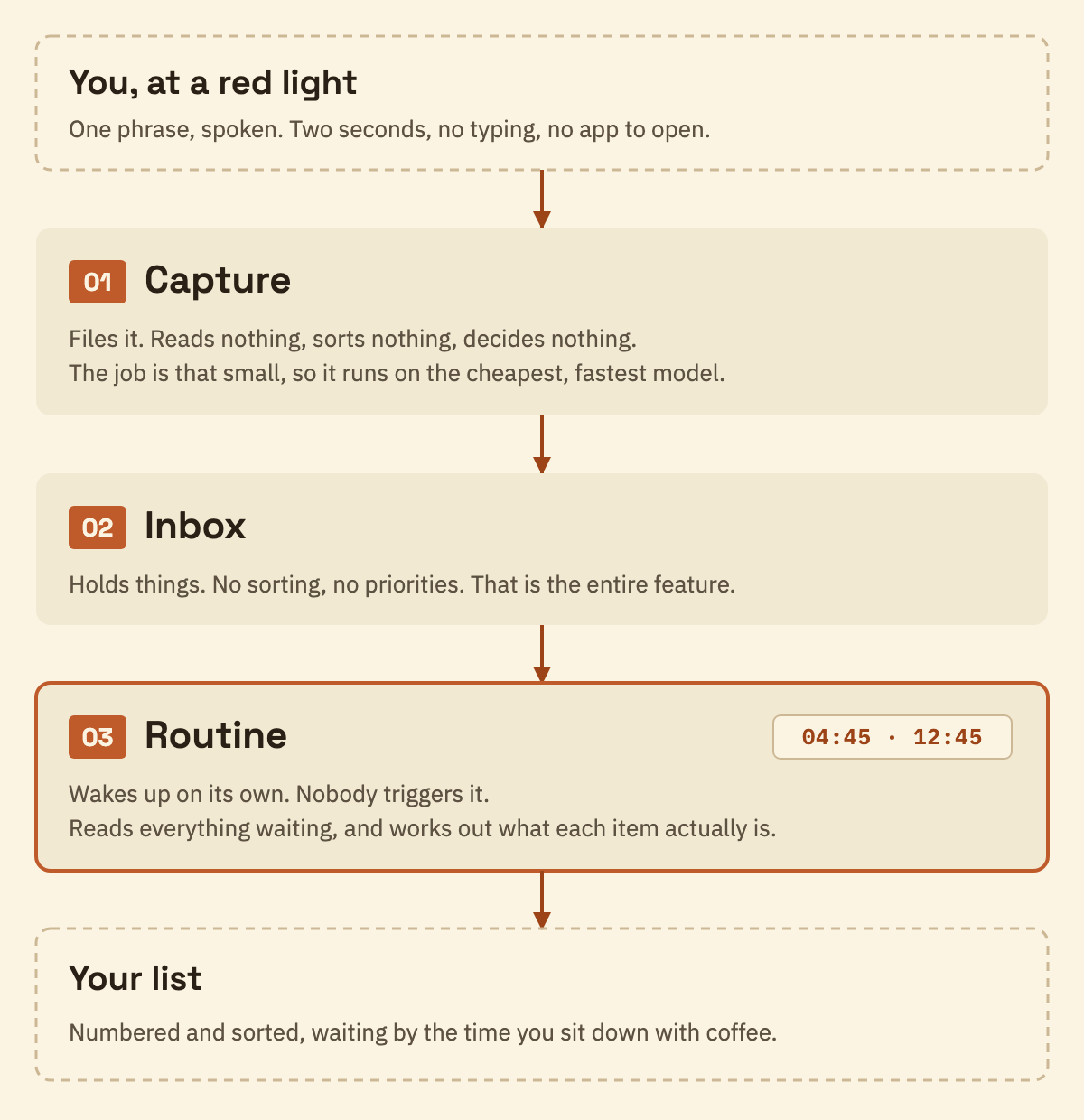
Three parts, and only the first one is mine to touch day to day.
One: the capture. A link, a news article, or an idea I dictate at a red light. I say one short phrase, and that phrase runs a saved instruction that drops whatever I just handed it into an inbox folder. That is the entire job. It does not read the link. It does not decide anything. It files. And because the job is that dumb, I run it on the cheapest, fastest model there is. This is the hire-the-right-model idea from Issue 04 pointed at the smallest job in my whole operation: filing does not need my best thinker, it needs my quickest one.
Two: the inbox. A folder that holds things and does nothing else. No sorting, no notifications, no decisions, no due dates. It sits there and collects. This is the part people skip, because a folder that does nothing feels like a missing feature. It is the opposite. It is what lets the capture stay free.
Three: the routine. Twice a day, at 4:45 in the morning and again at 12:45, a scheduled task wakes up on its own, reads everything sitting in that inbox, works out what each item actually is, and leaves me a sorted list. Nobody triggers it. It is the same move as the schedule from Issue 07, pointed at a different job. The early run means the night's captures are sorted before I am awake. The midday run catches everything I threw at it during the morning, so the afternoon starts clean too.
Then the only part that costs me anything: I read the list. Anything it got wrong I fix in one line. That is about a minute of my morning, and it is the minute that makes the other twenty-three hours worth trusting.
Why three separate parts instead of one smart app? Because capturing is a two-second reflex and sorting is thinking work. What is this, does it matter, where does it belong. If I had to answer those questions at the red light, I would stop capturing inside a week. So the capture step is allowed to be dumb, and every decision waits for the routine. I do not need my inbox sorted at 11pm. I need it sorted by the time I sit down with coffee.
|
Plate 01 · two seconds, one hand
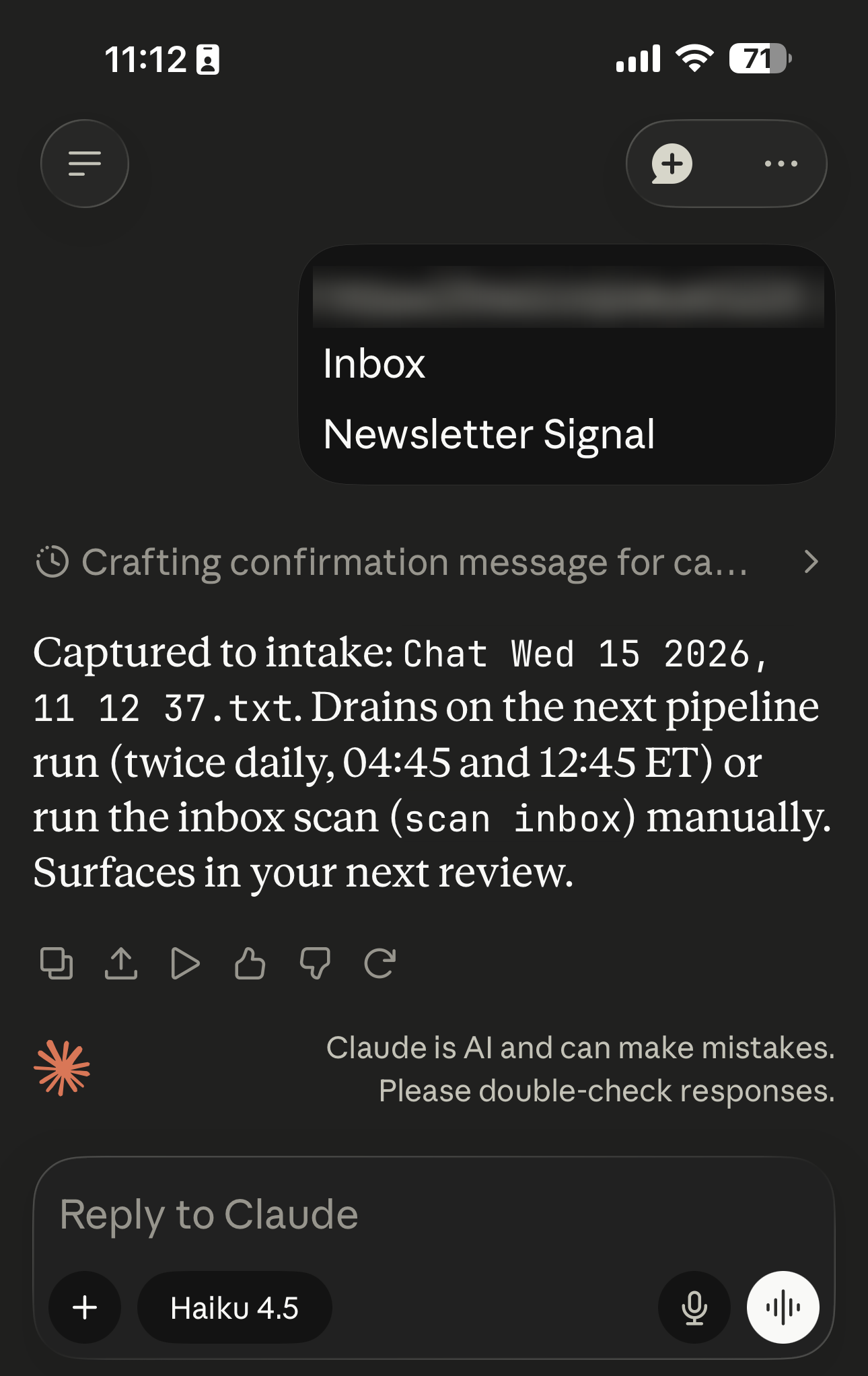
This is the whole interaction. I talk, it files, I put the phone back in my pocket. No list to pick, no due date to invent. Look at the model selector at the bottom: Haiku, the cheapest and fastest one there is. Filing does not need my best thinker.
|
|
The one rule that matters
Capture makes no decisions. If your capture step asks which folder, which project, or how urgent, it is not a capture step, and your team will quietly stop using it.
|
What almost broke it. My first version sorted each item the instant I captured it. It felt smart, and it was a mistake. Instant sorting turned every capture back into a decision, which is the exact friction I was trying to kill. The habit died for two weeks until I slowed it down.
Two things worth knowing before you build it. Screenshots and photos are their own animal. The capture files them without complaint, but making an image genuinely useful later takes a separate enrichment pass that reads the picture and writes down what is actually in it. That is its own build and its own issue, so I am leaving it out of this one. And the routine removes duplicates, so when I capture the same link twice, and I do, I do not end up with two copies.
If you are on ChatGPT or Gemini: both take voice on mobile, so the capture half works anywhere. The inbox and the overnight sort are the part someone has to build for you. No chat app does that on its own.
What to ask your builder for. You do not need my exact setup. You need three things wired together, in this order. A way to capture from your phone in one step, ideally by voice. An inbox that only holds things and makes no decisions. And a routine that reads that inbox on a schedule and hands you a sorted list.
The capture step is the one that has to be effortless. Get that wrong and nothing downstream matters, because the inbox stays empty. Get it right and you will be surprised how much you were losing.
|
On the site · free
Capture without typing
The whole thing, written out. The three fields you paste into the skill form to build the capture yourself in about four minutes, and the sorting brief you hand to your builder. Steal both. Get the playbook.
|
Three things worth your attention this week
Work that runs without your laptop, proof that this was never a coding tool, and a look at the room you are actually in.
|
The one I'd read first, because it moves the build above. Claude's scheduled work now runs with no device online, and the whole thing reached mobile and web. That is the difference between a routine that runs when your laptop happens to be open and one that just runs, full stop. Mine is still the first kind, which is exactly why this caught my eye. Worth knowing the rollout order before you go looking: the new mobile and web access is landing on the Max plan first and widening over the following weeks, so if it is not there yet, that is why, not because you did something wrong. Anthropic, "Claude Cowork is coming to mobile and web" · Jul 7
More than nine in ten Claude Cowork sessions have nothing to do with coding. Anthropic looked at 1.2 million sessions across more than 600,000 organizations. Business process and operations came first at 33.4%. Software development was 8.7%. I keep this one handy because the loudest AI coverage you see is about engineering, and it quietly teaches owners that none of this was built for them. The data says the opposite. The biggest single use is the work around the work: the pile that is nobody's actual job and that your whole week disappears into anyway. Anthropic, "How people are using Claude Cowork" · Jul 7
Two thirds of small businesses now use AI, and seventy percent of them say they still need training to use it properly. The survey is 561 owners and decision-makers, weighted to construction, professional services, restaurants and retail, most of them between one and two million in revenue. That is this room, not a conference stage. Adoption climbed from 55% to 66% in a year, which tells you the tools stopped being the hard part a while ago. Knowing what to point them at is the part nobody solved. Isaac M. O'Bannon, CPA Practice Advisor · Jul 14
The word behind every "second brain" pitch
One term you will hit the moment anyone sells you a system for your ideas.
|
The word is "capture." In productivity tools it means one specific step: getting a thought out of your head and into a place you trust, before you decide what to do with it. That is it. No folder, no priority, no due date. Just out of your head and somewhere safe.
The mistake almost everyone makes, and almost every "second brain" product quietly encourages, is collapsing capture and organizing into one step. So every stray thought arrives demanding a decision: which project, which list, how urgent. That decision is small, but it is a decision, and the friction of making it a dozen times a day is the exact reason the thought never gets written down at all.
Separating the two is the whole point. Capture with zero decisions. Organize later, in a batch, or hand the organizing to a machine while you sleep, which is what the build above does.
The takeaway for Wednesday lunch. When someone sells your team a "second brain," ask one question: how many taps does it take to capture one thought. If the answer is more than one, your team will not use it, no matter how good the rest of it looks.
Stop typing at your desk too
The build above is for the road. This one is for your keyboard.
|
The build above is about capturing on the move. I have stopped typing at my desk too, and it is the single change that made me fastest at working with AI.
When I am at my keyboard, I talk more than I type. A dictation tool turns talking into clean text in whatever app I am already in. I use Wispr Flow. There are others, and the specific one matters less than the habit. The reason it matters for AI work in particular is that the bottleneck with a tool like Claude was never the model. It is how fast you can get what is in your head into the box. Typing is the slow part.
Talking is two to three times faster, and it quietly produces better prompts. When you speak, you explain things the way you would explain them to a person standing next to you: the background, the constraint, the thing you are actually worried about. When you type, you get terse, because typing is work. Terse prompts get worse answers. Not because the model is fussy, but because you left out the half of the problem that was in your head.
If you do one thing this week, turn on dictation and use it for a full day. It feels strange for about an hour and normal after that.
Talk Wednesday
One question back to you, and the fastest way to reach me.
|
|
What is the best idea you lost this week?
Reply and tell me where you were when you had it, and I will tell you how close you are to never losing the next one. This is the build with the least setup in the whole newsletter. It comes straight to me. [email protected]
|
Talk Wednesday. Marc Marc Kleinmann · The Operator's Edge |
