
|

|
In this issue
|
Happy Wednesday, and I hope you had a great Fourth of July weekend. Some sun, some grilling, a little time off the clock. Though if you are anything like me, "off the clock" still included one quiet evening chatting with Claude while everyone else watched the fireworks. No judgment here.
Now back to it. This issue is a build I have been meaning to write up for a while: the system that catches everything you decide in a meeting before it disappears. Claude reaches into my meeting recorder on a schedule, pulls the transcript, and turns it into notes, tasks, and a ready-to-send follow-up, with no note-taking on my end. I will walk you through the simple version anyone can set up, plus the fully automatic version if you want it completely hands-off.
After the build: two reads worth your time, the word "webhook" decoded in plain English, and a note from my own desk on the one thing I still read by hand before anything sends. Let's get into it.
Transcript in, follow-through out
Every meeting should update your CRM, tell your team, and draft the emails to everyone who was there. Here is the one that does all three while I move on to the next thing.
|
The work of a meeting is not the meeting. It is the twenty minutes after, when someone has to open the CRM, type what was decided, post the recap so the team knows, and write the follow-up email to everyone who was on the call.
That twenty minutes is where most of it quietly dies. The notes never make the CRM. The team hears a version three days later. The follow-up gets written on Friday, or never. Nothing crashed. The follow-through just evaporated.
So I stopped doing that twenty minutes. Now a meeting ends, and by the time I look again the CRM is updated, the recap is in Slack, and the emails to the attendees are sitting in my drafts. I approve, and it goes. The whole thing keys off one artifact: the transcript. Your recorder already makes it, and everything downstream reads that, not the meeting, which is what makes this work no matter which tool you record with.
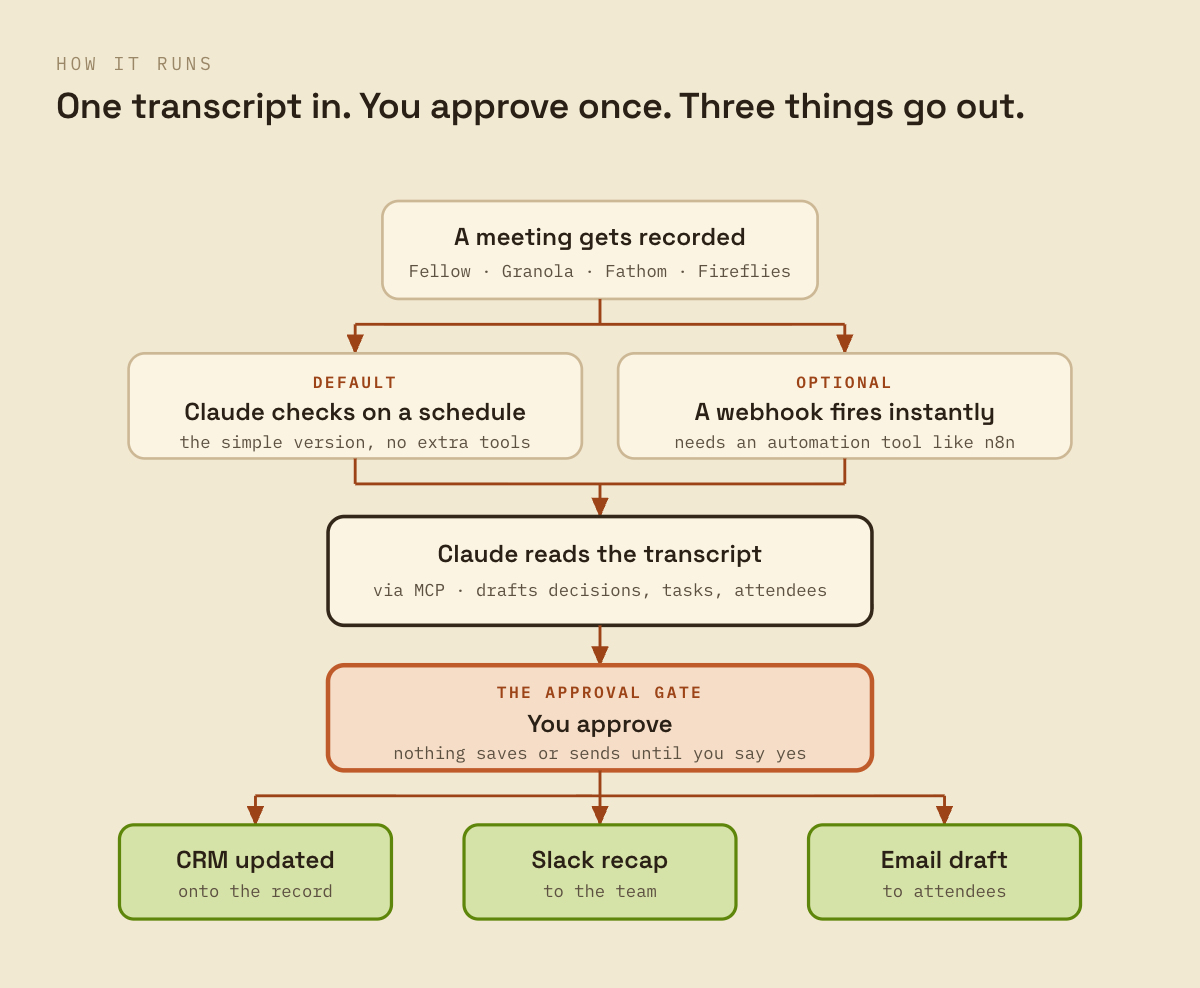
Read it top to bottom and the shape is the point. A meeting gets recorded. Claude reads the new transcript on a schedule and drafts what happened: the decisions, the action items, who was there. You approve. Only then does the CRM update, a clean recap post to Slack, and a follow-up email to everyone on the call land in your drafts, ready to send.
The recap and the email are rendered from the same custom template, so they look like you sent them, not like a bot filled in a form.
The one choice you actually make is how it gets triggered. Two ways, and you only need one. The default needs no extra tools: Claude checks your recorder on a timer and pulls any new transcript. Nothing to host, nothing to maintain, and it is where you start. The optional version is instant: if you already run an automation tool like n8n, a webhook fires the second a transcript is finished instead of waiting for the next check. Faster, one more thing to run.
|
The one rule that matters
Pick exactly one trigger. If you turn on the instant webhook, turn off the scheduled check, or both fire and you process the same meeting twice.
|
Why it works with your tool, not just mine. Mine records with Fellow. It works the same with Granola, Fathom, and Fireflies, because all four connect to Claude directly and all four hand over a transcript. Zoom and Google Meet need a paid step to reach the transcript, so they are more setup. The point stands either way: you are automating off the transcript, so the recorder is a swap, not a rebuild.
The approval gate is the feature, not the friction. The reason I let this touch my CRM and draft emails to real people is that it never acts on its own. It shows me what it plans to save and send, and waits. I have caught it putting a decision on the wrong record and misreading who owned a task. Thirty seconds of review, and it is right. An automation you have to babysit is worthless. An automation that drafts and waits is the one you actually trust with client-facing work.
|
On the site · free
The Meeting Follow-Through playbook
The full runbook, both trigger paths, and the exact HTML template I use for the recap email and the Slack message. Steal the template, wire it to your recorder, and ship it this week. Get the playbook.
|
Two things worth your attention this week
The follow-up that writes itself, and the reason the boring ninety percent is the whole game.
|
The one I'd read first: the follow-up that writes itself the moment a meeting ends. Allie K. Miller runs her business as a set of named agents, and buried in her workforce tour is the exact thing this issue is about: "All I have to do is say, 'hey Simon, just wrapped the Microsoft workshop,' and the follow-up draft, based on the workshop transcript, written by Chandler's team, is in my inbox one minute later." Same move, bigger stage. The meeting produces a transcript, and the transcript produces the follow-through. Her framing is worth the read: you stop writing prompts and start writing job descriptions for the work you keep redoing. Allie K. Miller, "How I built my AI agent workforce" · Jun 17
Nine of the ten steps in making a process AI-native are not the AI. The model is step four. Everything around it, the review step, the ownership, the "what happens when it is wrong," is the other nine, and it is where the work actually lives. Exactly why the approval gate in the build above is the build, not an afterthought. Alex Lieberman on LinkedIn · Jun 26
The word behind every "it triggers automatically"
One term you will hit the second you look at automating anything. Here it is in plain English.
|
A webhook is one tool phoning another the instant something happens. When a vendor says "it triggers automatically," they mean a webhook: your meeting tool calls your automation the moment the transcript is ready, so nothing waits.
The alternative is a scheduled check, where your automation looks for new work every so often on a timer. Both get you to the same place. The webhook is instant and needs a tool to catch the call. The scheduled check is simpler and runs a little behind.
The takeaway for Wednesday lunch. Instant or on a timer is the entire trade in the Build above. Start with the timer. Add the webhook only when the wait actually costs you something.
What I still read before it sends
Automating the legwork only works if you are clear about the part you keep.
|
I let this thing draft emails to my clients. I do not let it send them. That line is the whole reason I trust it with client-facing work at all, and it is the part I want you to copy more than any of the wiring above.
Here is the honest split. The automation is genuinely better than me at the legwork. It reads a forty-minute transcript in seconds, never misses an action item because it got distracted, and produces a clean draft while I am already in the next meeting. That part I hand over without a second thought. But it is not better than me at judgment, and it never will be, because judgment is not a transcript problem. I have watched it put a decision on the wrong client's record. I have watched it read a throwaway comment as a commitment, and a real commitment as a throwaway. Each time, the draft looked completely confident.
So I draw the line on purpose, and the same way every time. Gather, do not decide. Draft, do not send. Surface it to me, do not act on it. The automation gets me to a good draft in seconds. Whether that draft actually goes, and in what words, and to whom, stays mine. The thirty seconds it costs me to read it is not overhead I am trying to remove. It is the point.
The mistake I watch operators make is automating the judgment along with the legwork, because the tool is happy to do both and the demo looks amazing. Then one wrong email reaches one real client, and they switch the whole thing off. Keep the legwork. Give away more and more of it. But the moment your name is on something a customer will read, put your eyes on it first. That is not the part AI takes off your plate. That is the part that was always yours.
Talk Wednesday
One question back to you, and the fastest way to reach me.
|
|
What do you record your meetings with?
Reply and tell me, and I will tell you how close you are to having this running. If you run even one meeting a week that produces follow-up, this is the build with the fastest payback in the whole newsletter. It comes straight to me. [email protected]
|
Talk Wednesday. Marc Marc Kleinmann · The Operator's Edge |
