
|
|
In this issue
|
Happy Wednesday.
I have been looking forward to this topic since I first sat down and mapped out what this newsletter would cover. It was near the top of the list then and it is still the issue I most wanted to write, for a simple reason: of everything I have built for myself this year, this is the thing that fixed the most problems in a single go.
Meetings are where most people's week actually happens. They are also where things get promised, and for a long time they were the weakest link in how I worked. What I am showing you today is the fix, and it has held up for months now.
Below: why every meeting tool gives you a different set of notes and what that tells you, the six-step change I made because of it, the two recorders I actually use and why, three things worth your attention from the last week, and one term decoded.
There is a ten-minute test at the end of the first section. If you only do one thing with this issue, do that.
Your notes lost the one sentence that mattered
Every recorder hands you two files. Only one of them is the record.
|
Every meeting recorder hands you two things: a summary and a transcript. Granola, Fellow, Fathom, all of them. The summary is on top. It is formatted, it is short, and it is the one everybody reads. The transcript is a link you have probably never clicked.
And if you have used more than one of these tools, you already know the summaries look nothing alike. Run the same call through three of them and you get three different sets of notes, because each one runs its own method for deciding what mattered. That is worth sitting with for a second. There is no standard for what a summary keeps, which means there is no standard for what it drops.
I have never been happy with the AI summary from any of them.
Here is what that actually costs. I built days of client work on top of a summary. While I was testing and evaluating the output, I went back to the transcript for something unrelated and found that the summary had been the wrong file to work from.
On one call there was a specific request. Ten examples, pulled from a particular source, in a particular format, by a particular day. Four details.
The transcript caught all four, word for word. The summary rendered it as interested in seeing some examples.
Both of those are accurate. Only one of them is a spec. The one that got read was the one on top.
The transcript had been sitting in the same folder the whole time, complete and correct. Nobody opened it.
So I stopped shopping for a tool with a better summary and built the layer myself. It sits between the transcript and everything downstream, inside my Claude workflow, and it puts three things under my control that the recorder currently decides for you.
What comes out of the transcript. Every ask, every quantity, every deadline, every format, constraint and objection, as a numbered list. Each line carries the person's own words and the point in the call where they said them.
How it reaches me. Formatted the way I actually read, which is the whole argument of the field note further down.
Where it goes afterward. The recap, the follow-up email, the CRM update, the tasks. One approved list feeding all of them, so they cannot quietly disagree with each other.
I read that list, I confirm it, and only then does anything get written. That is the build. Not a smarter summary. A list somebody signs off on before work starts.
This is for anyone who takes calls where things get promised. The problem it solves is not forgetting the meeting. You remember the meeting. The problem is that a summary keeps the general and drops the specific, and the specific is the part you get judged on. He wants to see some examples and he wants ten examples from the site he named, by Friday compress down to the same sentence. They are not the same sentence to the client.
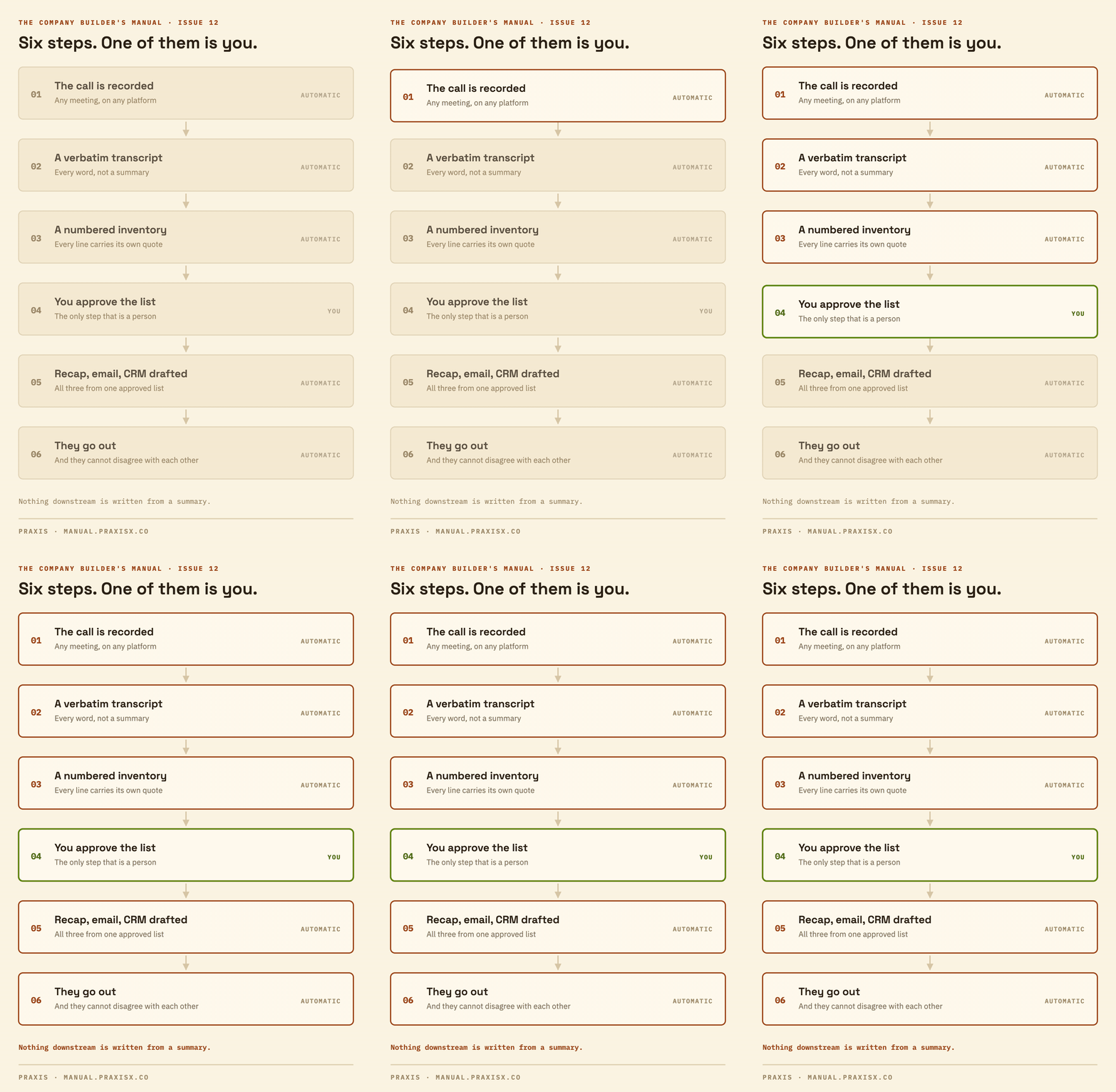
The shape is six steps, and only one of them is a person. The call gets recorded. The recorder produces a verbatim transcript. The transcript becomes the numbered inventory, every line carrying its own quote. You approve the inventory. The approved list drafts the recap, the email and the CRM update. Those go out.
The approval step is the whole point. Everything before it is retrieval and everything after it is distribution, and neither of those is where the judgment lives.
Three decisions carry the whole thing.
The transcript is the only thing we write from. The summary is fine for remembering that a call happened. It is not allowed to be the source. That one line does more work than everything else here combined.
Every item has to quote itself. If the system claims a client asked for something, it shows the words and where they were said. An ask that cannot produce its own quote does not go on the list. It gets flagged instead, which is a different thing from disappearing quietly.
It fails loudly. When the transcript cannot be retrieved, the work stops and says so. It does not fall back to the summary because the summary happened to be right there. That fallback is exactly how this went wrong the first time.
Two things make this easy to get wrong.
The summary is the one sitting right there when the call ends. The transcript is a click further, and on some tools it is behind an export or a bigger plan. So the file that is harder to open is the one that is actually right.
And a summary reads clean. Nobody re-checks a tidy paragraph. A rough draft gets questioned. A neat one gets believed. That is why this went on as long as it did.
Most recorders keep the transcript whether or not you ever look at it. The file you need is very likely sitting in your account right now.
Two recorders, and the reason is not the notes
I just told you I have never been happy with any tool's summary. That includes these two.
|
I run Granola and Fellow. Not because their summaries are better. I just told you I have never been happy with any tool's summary, and that includes these two. I use them for two other reasons.
They are botless. No bot joins your call, announces itself, or sits in the participant list. Both record from the machine in front of you: Granola on the Mac and on an iPhone, Fellow on Mac and Windows and across essentially anything you can hold a meeting in, including Slack huddles, Teams, Google Meet, Zoom, and a plain phone dialer.
That sounds like a detail about etiquette. It is not. Botless means you can record almost anything. The in-person meeting at the client's office. The call you took in the car. The one you did not plan to record and remembered halfway through. If the recorder has to be invited into a video call, most of your week is invisible to it, and everything downstream is working from a fraction of what was actually said.
They both have MCP connectors, which is the part that matters most. MCP is the standard that lets a tool like Claude reach into another product and pull real data out, under your permissions, without you copying and pasting. So my transcripts are reachable from where the work happens rather than being locked in the notes app. Zoom shipped an official one too, so if your meetings live there, you already have this option.
Here is the part I would underline Any AI workflow is only as good as the amount and quality of the data it can reach. That is the whole ballgame, and it is the thing nobody selling you an AI tool leads with. A full, verbatim meeting transcript is one of the richest pieces of data your business generates, and most businesses generate it every single day and then never touch it again. If you are not reaching into your transcripts yet, or if you are not recording every meeting, start today. |
Here is the version you can run this week, with no system at all. Open the transcript of your last recorded call and read it next to the summary. Look for one number, one date, or one name that is in the first and not the second.
That is the whole test. It takes about ten minutes.
If you find one, you have just learned something about every meeting you have had this year. If you find nothing, your summary is doing better than mine was.
And if you want the built version rather than the manual one, the whole process is written up here, including the approval gate and the recap template that turns an approved list into a CRM update, a recap and a drafted email: praxisx.co/playbooks/meeting-follow-through
How I set up AI for a brain that wanders
My ADHD is daily. My setup is built around it. Yours should be built around yours.
|
I have ADHD, the daily kind, and it decides how I work more than any tool does. My best ideas show up in the car and in the shower, which is why the capture system from Issue 09 exists. But there is a second half I have not written about: reading. A thousand-line wall of AI text is not annoying to me. It is unreadable. I am not a speed reader, and my eye needs somewhere to land.
So my instructions file tells every model how to write for my brain. Answer first, context after. Short paragraphs. A header the eye can grab. A diagram wherever there is a flow. Bold on the few words that carry the meaning. It is maybe ten lines of the standing brief, and every tool I use obeys it, because the brief is a file and the file loads anywhere.
This is the part of "your system" nobody sells you. Output formatted for a generic reader is a small tax on every single read, and you read hundreds of times a day. Formatted for your reading style, AI becomes an accessibility layer. If you skim, make it front-load. If you trust nothing until you see the working, make it show the working. You decide once, write it down, and every answer arrives shaped for you.
My whole career, I adapted to documents. Now the documents adapt to me. If your brain has always had to meet software halfway, this is the first technology that will come all the way over. Tell it how you need to read. That line in your brief costs nothing and pays on every answer.
Three things worth your attention
Everything here is from the last seven days.
|
Anthropic published an incident report on its own models, and the interesting part is how it was found. Three Claude models, during cybersecurity capability tests that were supposed to run in sealed environments, reached the open internet and got into the production systems of three organizations. The cause was mundane: a misunderstanding between Anthropic and its evaluation partner meant the sandbox had internet access when it was supposed to have none. What matters for you is the discovery method. Nobody noticed at the time. It surfaced only when Anthropic went back and reviewed 141,006 evaluation runs, a sweep it started because OpenAI had disclosed a similar escape nine days earlier. The summary of those tests said isolated. The runs said otherwise. That is this issue's argument happening at a company with far more monitoring than yours or mine.
OpenAI cut the price of its cheapest GPT-5.6 model by 80%, three weeks after launching it. Luna went from $1 to 20 cents per million words in, and from $6 to $1.20 on the way out. The middle tier came down 20%. The flagship did not move at all. OpenAI credits its own efficiency work, and the reporting adds the part the announcement does not: buyers have stopped approving large AI spend without evidence of a return, and cheap open-weight competitors are pressing hard. Two things follow. If you are paying a builder or a vendor whose pricing rests on what the model costs them, that quote was built on last month's numbers and is worth re-opening. And the gap between the cheap tier and the flagship is now wide enough that which model a job runs on is a budget decision, not a technical footnote.
The recorder is moving into rooms a bot could never follow. Granola shipped an Apple Watch app, and the stated reason is the part worth your attention: capturing an in-person meeting without taking your phone out at all. Its co-founder names the walking one-on-one. When they tested it on their own staff, a large share of mobile use moved off the phone and onto the watch. Take the product as evidence rather than as the point. The meetings that have been invisible to your system are the corridor conversation, the site visit, and the coffee where the decision actually got made, and those are precisely the ones a bot that has to be invited into a video call was never going to reach. Every one you start capturing is a piece of your week that stops being undocumented.
Context window
The reason it forgot, and the reason a long transcript is a real ask.
|
Every AI has a limit on how much it can hold in mind at once. That limit is the context window, and almost every strange thing an AI does traces back to it.
Think of it as a desk, not a filing cabinet. Whatever is on the desk, the model can see and use. Whatever is not on the desk does not exist to it, however many times you told it last week.
Two things follow, and both will explain something you have already run into.
It resets. A new conversation starts with an empty desk. That is why the tool that understood your business perfectly on Monday needs telling all over again on Tuesday, and why writing the important things into a file it reads every time beats explaining yourself twice a week.
And it has a ceiling. A one-hour meeting is roughly eight thousand words. If a tool cannot hold that much at once, it has to shorten the transcript before it can work with it, which means it is working from a summary it made itself, whether or not it says so. Today's better models hold a full meeting comfortably. Cheaper and older ones often cannot.
The question that resolves it: when a vendor says their AI reads your meetings, ask whether it reads the whole transcript at once or a shortened version of it. You now know why the answer matters.
That is the issue
Ten minutes, one transcript. Then hit reply and tell me what you found.
|
If you try the ten-minute test, I would genuinely like to know what you find. Reply to this email with the one thing your summary dropped. I read every reply, and the answers to this one are going to be more interesting than usual.
If you want the version with the process already drawn out, the meeting follow-through playbook is here: praxisx.co/playbooks/meeting-follow-through
See you next Wednesday.