
|

|
In this issue
|
Happy last Wednesday of July.
This issue is written for a specific person: the one who has heard that Claude is the one to use, believes it, and has still never opened it. No account, or an account you poked at twice and abandoned. If you are already running six workflows, this issue is not for you and next week's is.
I am going to open with how I got into this, because the useful part of that story is not the credentials. It is that I was confused first, for a long time.
Then the main piece, and it is literal this week: exactly what to do in your first thirty days. Seven steps, in order, and the first one takes four minutes. After that, the one document I would write before anything else, plus the folder to put it in, and three reads worth your time.
No jargon decode this week. The opener took the room.
I did not understand this either
|
I ran a company called VIRTUALhaus from 2018 to 2022. A 3D marketplace for building products, built on Unreal Engine and Revit. We raised a seed round, got to a working product, and wound down when the funding market froze.
In 2019, in the middle of that, I started reading about machine learning and computer vision models. Nobody told me to. I kept looking at the work in front of me and thinking there was something in this for workflows that already existed. That was the whole thought. Not "this changes everything." Just: this might do something for the way we already work.
That reading is what sent me to MIT. I took "Artificial Intelligence: Implications for Business Strategy" through MIT Professional Education in December 2021. The class answered part of the question. Working with a machine-learning lab in Berlin answered more of it. We built a prototype where you uploaded a 2D floor plan and got back a walkable 3D model with material takeoffs, estimates, and subcontractor bid detail.
Then the deliberate work. Image, video, and 3D generation models first, which became crea8or.STUDIO. Then ChatGPT landed and language models became an equal focus. Then Claude, and I built my first internal workflows.
Here is the part that matters to you.
I am not a coder. I am not a developer. I am not a trained engineer. I never really learned to code and I cannot write code by hand. What I can do is write code with AI. And I never read the code. I read the build plans and the system reports I have built around it.
Sit with that one, because it is the whole permission slip.
In 2019, turning a 2D floor plan into something useful took a machine-learning lab in Berlin, a team, and the venture round that paid for them. Six years later I built something of that same shape myself, from floor plans and elevations, with no coding help.
Same problem. Six years apart. The second one needed no team.
That is what led to Merlin, by Praxis, the system I now run my own company on.
I am not telling you this so you go build software. I am telling you because I started at zero too.
I could not build an app. I could not write a line of code that ran, and I still cannot. Everything I just described came after years of being confused in public, and the competence, when it finally showed up, was much smaller than I had braced for.
So if you have not touched this yet, it is not too late. It is genuinely not too late.
But I am not going to tell you there is no hurry, because I think there is. Not panic. The kind of hurry where the people who start learning this now will be running their companies differently in a year than the people who wait. If you want to be on that side of it, learn everything about this you can, and do it deliberately.
You have heard of Claude. Here is how you actually start.
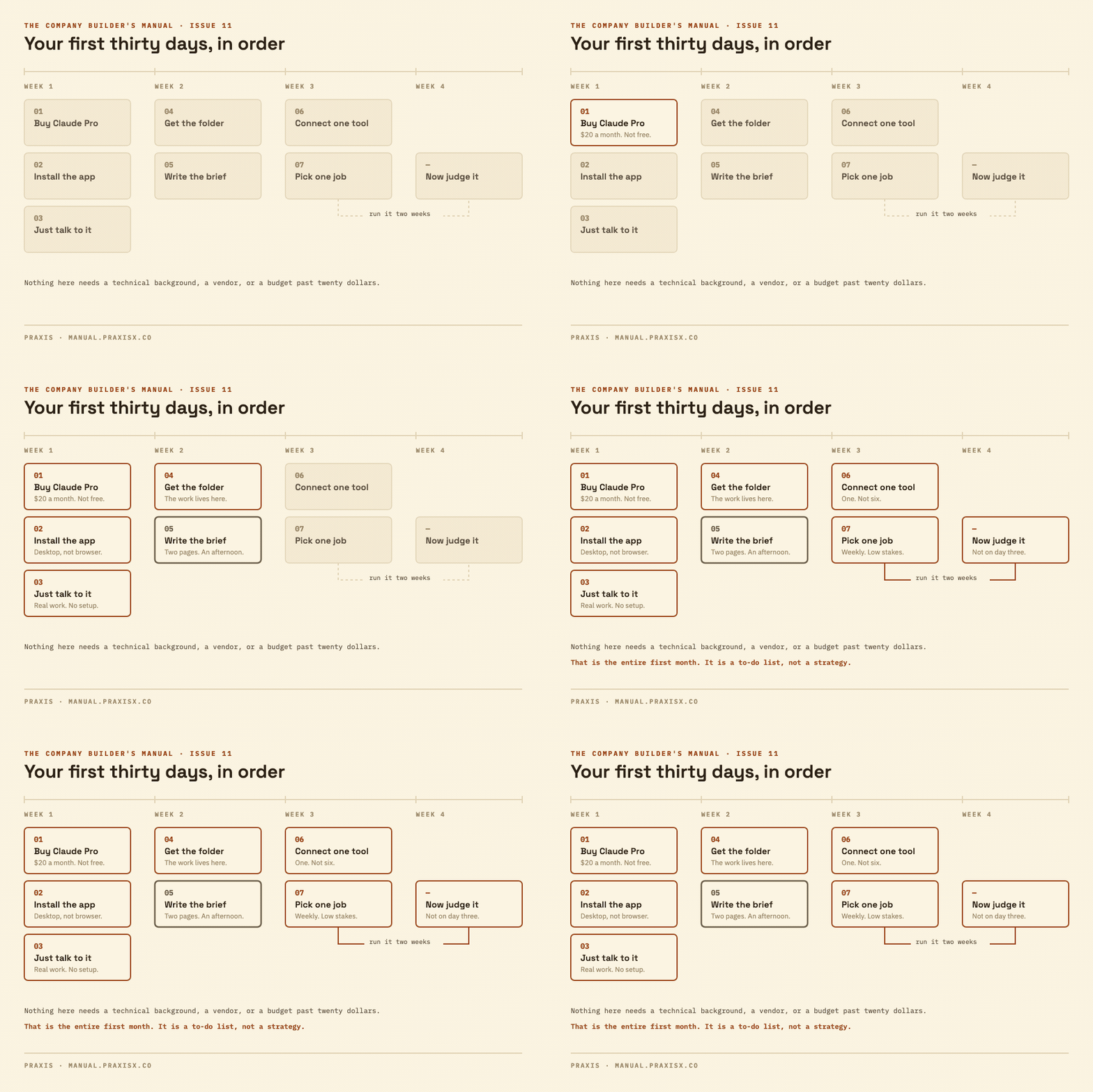
Seven steps, in order. The first one takes four minutes.
|
This one is literal. No frameworks, no readiness assessment. If you have no account, or an account you opened once and abandoned, this is the sequence. Do it in this order, because each step is what makes the next one work.
I am going to name one tool and stay with it, because a beginner comparing three tools learns none of them. I use Claude and I am recommending Claude. If you already pay for ChatGPT or Gemini because it came bundled with something else, almost all of this still applies, and I have put the equivalent names in italics where they differ.
| 01 | Buy the paid plan. Twenty dollars. |
Claude Pro. $20 a month, or $17 a month if you pay for the year. Start monthly.
Not the free tier. The free plan does not include the two pieces the rest of this sequence runs on, so you would be evaluating a demo and concluding the product is thin.
Go to claude.ai, make an account, pick Pro. Four minutes.
This is first on purpose. The hours an owner spends deciding whether to risk twenty dollars are worth many multiples of twenty dollars.
| 02 | Install the desktop app. |
claude.ai/download. macOS 11 or newer, Windows 10 or newer. Download it, open it, sign in.
Use the app, not the browser tab. The browser is a chat window. The desktop app is the version that can reach your actual computer, your files, your folders, your calendar. That gap is most of the value and it costs you one download.
| 03 | Spend week one just talking to it. About real work. |
Do not set anything up yet. Open it and use it like a very well-read colleague who started this morning and does not know your business.
Paste in the email you have been avoiding and ask for three ways to answer it. Paste last month's numbers and ask what looks off. Describe a customer situation and ask what you are not considering. Talk at it for two minutes about a job and ask for the summary you would send the client.
You are not building anything this week. You are finding out what it is good at and, more usefully, where it is confidently wrong. There is no shortcut to that except a week of asking it real things and watching what comes back.
| 04 | Download the starter folder. |
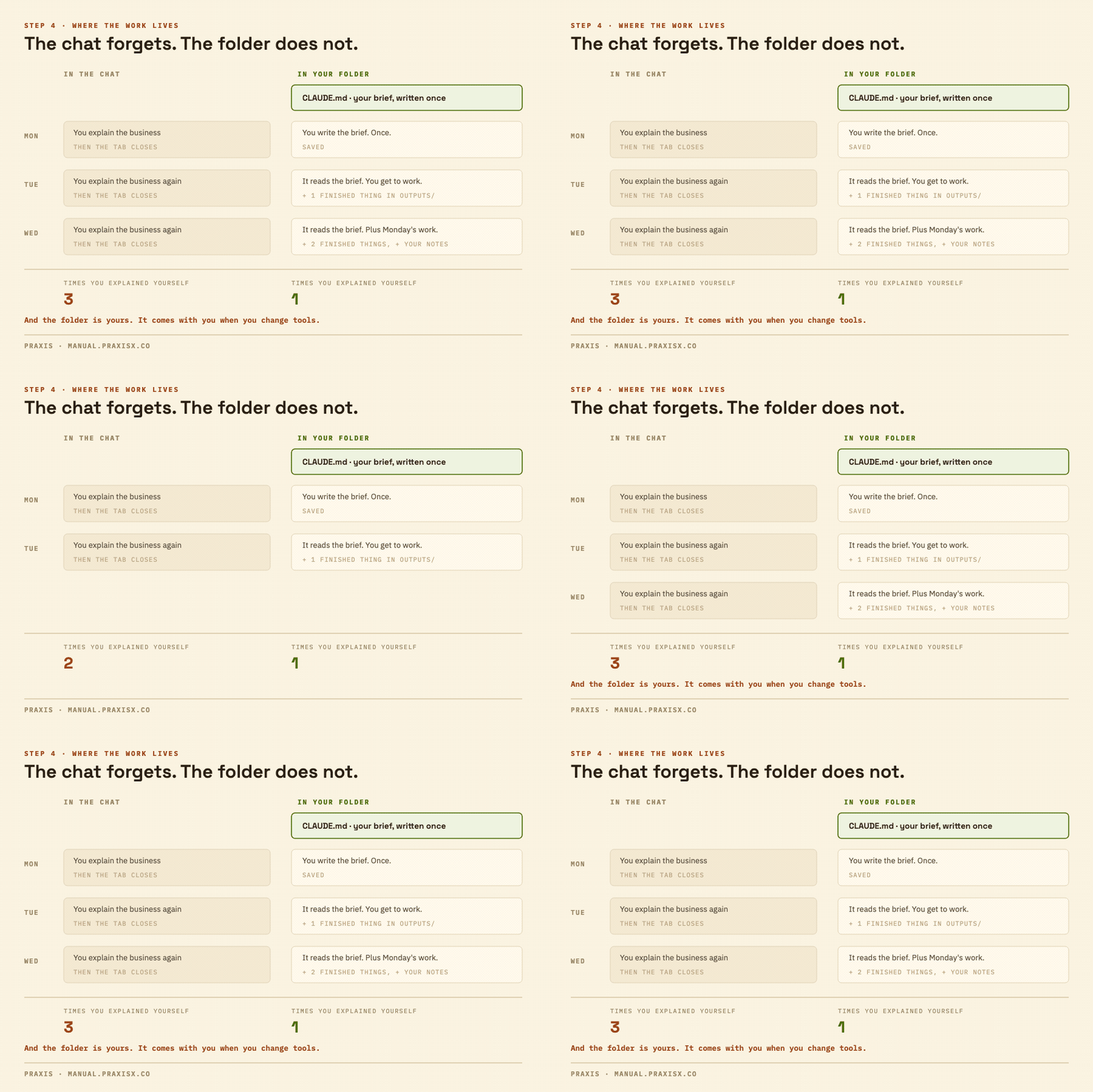
This is the part nobody tells a beginner, and it is the whole difference between a chat toy and something that runs a business. The work should live in a folder on your computer, not inside the tool.
Download the starter folder here. It is a small folder. A brief template with the six headings already in it, and four empty subfolders with a note in each saying what belongs there. Unzip it somewhere you will find it again, next to your other work folders, and rename it to your company.
You own that folder. When you change tools, it comes with you.
| 05 | Open the folder in Cowork, then fill in the brief. |
Cowork is in the desktop app, on the paid plan you bought in step 1. It is where you hand Claude a folder and a job instead of a message. Point it at the folder you just unzipped.
Then fill in the brief. Six headings, already written for you, about two pages when you are done. What you sell and to whom. How you talk to customers. The rules that never bend. The words you never use.
Give it an afternoon. This is the highest-leverage hour in the sequence and it is the one everybody skips. The Build below is the filled-in version of that exact brief, mine, so you can see what one looks like before you write yours.
On ChatGPT this is Projects or a Custom GPT. On Gemini, a Gem. The pattern is universal. The names are not.
| 06 | Connect one tool. One. |
In the desktop app, connect the single system where most of your work already sits. For most owners that is email or the calendar. It is one click from the app's own connector list.
Do one, not six. Every connection is another place something can go wrong, and in month one you want to be able to tell which thing broke.
| 07 | Pick one job. Run it two weeks. |
Now, and not before, pick the job.
Weekly. Text-shaped. Low stakes. Something you already do badly and quietly resent. The Monday update you rewrite from scratch every week. The quote follow-up that goes out three days late because writing it is tedious. The vendor email you have now written ninety times in slightly different words.
Not payroll. Not anything a customer sees unedited. Not anything with a number in it you would be embarrassed to get wrong.
Then leave it alone for two weeks before you judge it. Most first attempts die on day three, on the wrong evidence: the answer comes back generic, you decide it is overhyped, you close the tab. Day three is the day it does not know your business yet. Two weeks in, corrected a few times against a written brief, it is a different thing. Judge it then.
What not to do |
What not to do in your first thirty days, which matters more than the seven steps above.
Do not buy anything that describes itself as autonomous. Do not hire an agency yet. Do not automate anything, meaning do not let anything run while you are not looking. Do not put anything sensitive in, not customer records, not financials, not contracts, until you know where it goes and who can see it.
And do not run three tools side by side to compare them. Twenty dollars on one tool you actually learn beats sixty dollars on three you sample.
The takeaway. Twenty dollars, a desktop app, a week of just talking to it, a folder, a brief, one connection, one job, two weeks. That is the entire first month, and it is a to-do list, not a strategy.
Notice what none of those steps required. No budget past twenty dollars, no vendor, and no technical background. What they do require is judgment, and judgment only arrives by doing it once. Which work is AI-shaped. What context is worth writing down. How long to give it before you call it. Nobody is born knowing that, and nobody learns it from a comparison chart. You learn it on one real job, over a month.
The two pages I wrote first
Before I built anything, I wrote a brief. Here is exactly what is in mine.
|
Not a prompt. A document. It sits in my own storage as a file, and every AI I use reads it at the start of the work.
Here is what is actually in mine, in order.
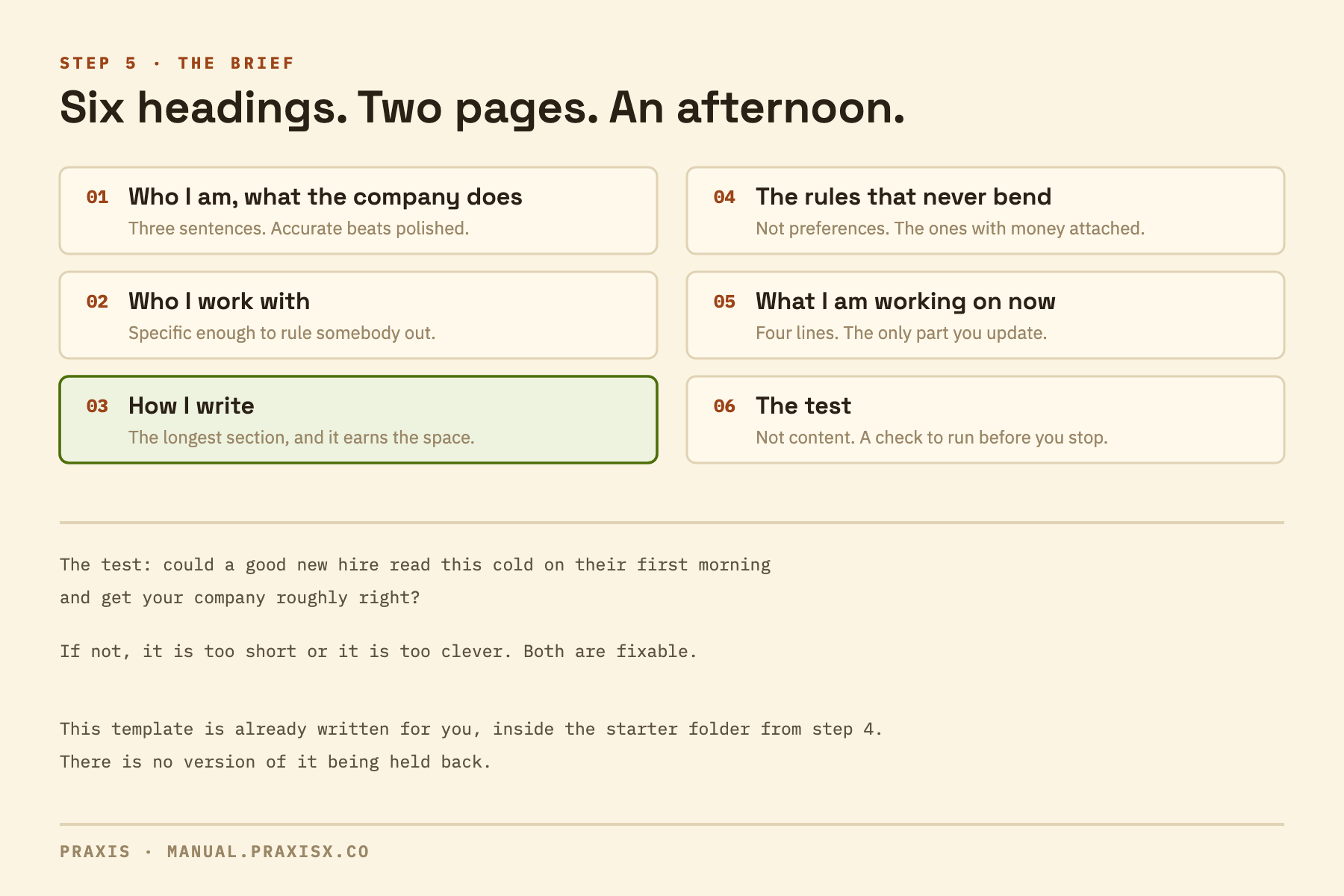
Who I am and what the company does. Three sentences. Praxis is an applied AI studio. I work with SMB and mid-market companies. I am in New York.
Who I work with. Not a persona exercise. The real shape: owners and ops leads at companies between five and fifty people that already pay somebody every month to run part of their operation.
How I write. This is the longest section and it earns the space. Short sentences. Specifics over adjectives. A list of phrases I never use, because "leveraging my expertise" turning up in my own newsletter would be worse than a typo.
The rules that never bend. Where files go. What never ships without me reading it first. What I never say to a client.
What I am working on right now. Four lines. This is the only part I update.
The test. Could a good new hire read this cold on their first morning and get my company roughly right? If not, it is too short or too clever.
Why this was the first build and not the fifth. Everything else I have made sits on top of it. The morning briefing, the client workflows, this newsletter. All of it assumes the brief exists. Without it, every conversation starts with me explaining myself again, which is the exact job I was trying to stop doing.
And it is mine. It is a file in my own folders. When I change tools, it comes with me. Written into a tool's settings box, it belongs to the tool.
What to ask, if you are having someone build this for you. Ask where the instructions live. If the answer is a screen inside their product, you are renting. If the answer is a document you own, you are building.
That list above is the whole template, and it is already in the folder from step 4. Six headings, two pages, an afternoon. There is no version of it I am holding back.
|
One ask, and it is the only one in this issue
Do step 1 this week. Twenty dollars. Then hit reply and tell me which step you stopped at.
I read every one of these myself. I am collecting them because where people actually stall is more useful to me than any survey, and I would rather fix step 4 for the next person than guess.
One line is plenty. “Stuck on the brief.” “Got to the folder.” That is enough. |
Three things worth your time
All three verified live this week. No Anthropic item this issue.
|
What separates the small businesses deploying AI from the ones still experimenting is not the tool they picked.
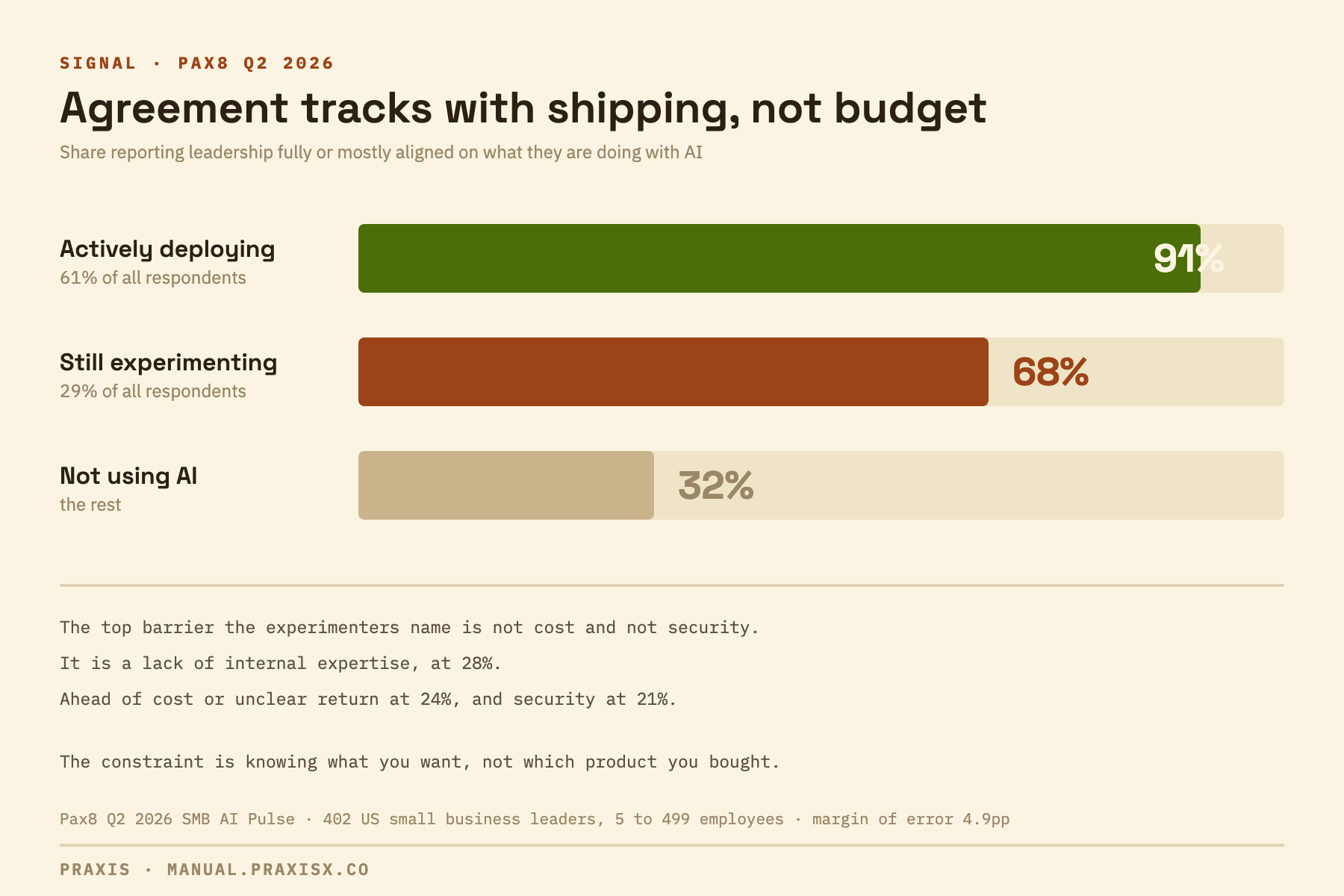
Pax8 surveyed 402 US small business leaders at companies from 5 to 499 employees. 61% are actively using AI, 29% are still experimenting. The number that says the most is about agreement, not technology: among companies actually deploying, 91% report leadership fully or mostly aligned on what they are doing with AI. Among the ones still experimenting, 68%. Among non-users, 32%. And the top barrier the experimenters name is not cost and not security. It is a lack of internal expertise, at 28%, ahead of cost or unclear return at 24% and security at 21%. Both findings point the same way: the constraint is knowing what you want, not which product you bought.
Nearly half of small businesses using AI are saving four or more hours a week.
Bluevine's 2026 report: nearly three-quarters of owners are using or testing AI, 48% save four or more hours a week, and 52% report a positive return. 24% say they have not seen a return yet, and the honest read of those two groups side by side is that the difference is the job they pointed it at, not the tool they bought. Worth holding against step 1 above: among small businesses that pay for AI at all, the most common bracket is $25 to $99 a month. Four hours a week against twenty dollars is not a close call, provided you point it at something that was actually costing you four hours.
OpenAI launched free small-business training, which is a good moment to say what these courses do and do not cover.
Announced July 21: webinars on using ChatGPT for accounting, marketing, and eCommerce, in-person Academy events, guides and customer stories, and partner integrations. It is a distribution move, obviously. It is also a real, free, structured way in for an owner who wants a starting point that is not a YouTube rabbit hole, and if ChatGPT is already what you pay for, take it.
One thing to know going in, and it applies to almost every AI course being sold right now, free or otherwise. Nearly all of them teach you how to write a better prompt. Prompting is real and it matters, and it is roughly one of six things you need to actually run this in a business. The others are knowing which work is AI-shaped in the first place, knowing where the thing is confidently wrong, choosing a tool on the job rather than the brand, connecting it to the software you already run, and keeping the whole thing alive past month three. A course that covers the first one and stops has not cheated you. It has just covered the first one.
That is the whole first month
Seven steps. You can start the first one before you finish your coffee.
|
No jargon decode this week, and no field note. The opener took the room. Both come back next Wednesday.
If you do one thing after reading this, make it step 1. Everything else in the list is easier than the decision to start.
See you next Wednesday.